Showing posts with label delphi. Show all posts

Thursday, February 15, 2018

Cool features and functions in Delphi


List of IDE features that are cool (when they work)

  • Search backwards - Ctrl+F to do a search in your code. F3 to go to the next position Shift+F3 to go to previous position.
  • Move/Relocate/Rename project's files directly from Project Manager
  • Navigate to recently modified code - Ctrl+Shift+F7 and Ctrl+Shift+F8
  • Search for usage - Right click a variable and invoke 'search for usage'. A panel will list all places in current project where that variable is used. In my cases this will make the IDE to freeze. 
  • UML diagrams (Live Diagrams) - simply doesn't work 
  • IDE insight (F6) - It could be useful but seems to list a lot of random items.
  • CodeSite - a logging system - I couldn't really find it useful
  • AQTime - Performance profiler + memory allocation debugger - I couldn't really find it useful


List of functions/units/classes that are cool (when they work)

  • SysUtils.GetHomePath - Returns c:\users\username\appdata\roaming.
  • IOUtils - Lots of new cool functions. Totally broken.
  • SplitString - Example of usage at the end of this document. Unfortunately, the function is VERY slow!
  • FindCmdLineSwitch - Example: System.SysUtils.FindCmdLineSwitch('-f', sFileName)
  • TThread.ProcessorCount;   { Specifies the number of CPU cores in the system }
  • TBinaryReader / TBinaryWriter - Nice but only half ass - Interesting but I recommend this library which is much faster: https://stackoverflow.com/questions/5639531
  • System.Diagnostics.TStopWatch - Can be used to precisely time your code.
  • $WeakLinkRTTI - Put these two directives in your DPR file (at the very top) to reduce exe size with 4%: {$WEAKLINKRTTI ON} {$RTTI EXPLICIT METHODS([]) PROPERTIES([]) FIELDS([])}
  • TStringBuilder - It was supposed to help you build strings. But it is horrible! Simply don't use it. It is painful slow.
  • PtInCircle & PtInRect - Tells you if a point is located in a circle. Could be handy one day.
  • TTimeSpan (System unit) is a data structure used for holding information about a period of time. The smallest unit of time is a tick which is 100 nanoseconds. The largest unit of time is a day.
CONST
  • SLineBreak - global constant that changes its value depending on target platform (Win/Linux/Mac)
  • Win32MajorVersion & Win32MinorVersion - To get current Windows version


List of VCL controls that are cool (when they work)

  • TJumpList - To list a custom file in a JumpList your program must be registered (in Windows registry) to be able to open that type of file. Another problem is that when the user clicks a 'recent file' in the JumpList, the message is not sent to your app directly. You need to intercept that message.


_________________________________

function CountWords(CONST s: string): Integer; { Might be faster than the one above }
VAR
   sArray: TStringDynArray;
begin
  sArray:= System.StrUtils.SplitString(s,  '.,? =<>*!-:;()/\'+cr+lf);
  Result:= Length(sArray);
end;


Tuesday, March 21, 2017

How to configure EurekaLog to send bugs via email

Email sender settings in EurekaLog v7


SMTP Server [1] Simple MAPI MAPI Shell (MailTo) SMTP client [3]
Can attach the ELP file Yes Yes [2] Yes [2] NoYes
See sender's email No [4] Yes Yes YesNo
Email client software* Not required Required Required RequiredNot required
Chance of success Highest chance among all methods High if email client installed WinMail & Outlook only!! High if email client installedI get a 'revocation function' error but for others is working
Can tell if email was successfully sent? No  Yes Yes Yes
Yes


1 - Many antivirus products will flag your EXE as virus


2 - if "Append bug report text in the message text" is UNCHECKED

3 - Typically, you should use either SMTP server or SMTP client, but not both methods simultaneously.
Bugged in EurekaLog v7.4.8.0 RC 1 - Error code = -2146885613 - The revocation function was unable to check revocation because the revocation server was offline. Maybe because: “Currently EurekaLog supports AUTH LOGIN and AUTH PLAIN authentication methods”?

4 - could be enabled via SetUserEMail function)
* If required: Email client must be installed and properly reconfigured. User must to click on "Send" in their e-mail clients. Automatic send without user actions is not possible. 

_____________ 

Please note that EurekaLog v7 is also plagued with several serious bugs! I contacted the producer but he didn't bother to reply until now.
 

Wednesday, March 15, 2017

Another bug in EurekaLog 7

I wanted to send an email ("Send via SMTP client") from EurekaLog v7.4.8.0 RC 1 but I was getting this error:

FAILED: Error code = -2146885613
The revocation function was unable to check revocation because the revocation server was offline
 
EurekaLog 7.4.8.0 RC 1
Testing send with TELMailSMTPClientSender
Options:
_BugAppVersion="21.0.17707.5020"
_BugID="73D40000"
_BugIDSource="bds.exe


My email is hosted by BlueHost but knowing how buggy EurekaLog is and considering the fact that all my accounts work flawlessly in Thunderbird I think the bug is not related to the BlueHost server.

I had to give up using "SMTP client" and user "SMTP server" instead.


Tuesday, August 16, 2016

Delphi is still in Top 20... barely

Delphi is still in Top 20... but barely. It is the last one. It may fall any time.
Too sad....


Saturday, August 6, 2016

Embarcadero finally decided to fix SOME bugs in Delphi


In the new road map, Embarcadero finally decided to fix SOME bugs in Delphi.

It seems good news but hold your horses:
1. They not always keep their promise related to the road map.
2. There are not so many bugs
3. They won't do all the fixes at once, but until 2018
4. Until 2018 another 500 new bugs (AT LEAST) will be introduced
5. We have to pay (not 59 bucks but HARD money) to get that non-buggy version of Delphi.

And in the end, what the fuck are we so happy that Embarcadero is fixing some bugs? Is not a present, a gift from heavens! Those bugs SHOULD NOT BE THERE anyway!

So, thank you Embarcadero for finally thinking to fix some bugs and FUCK YOU.

PS: In the next road map maybe you will introduce an item likes "free updates".

http://community.embarcadero.com/article/news/16418-product-roadmap-august-2016

Friday, April 29, 2016

Is (Embarcadero) Delphi's code optimized for speed? No? Here is how to optimize string speed

The short answer is a big NO!

No the long answer:
Today I needed a function that will wrap a string (a contiguous block of characters with no spaces) after 80 characters. Not only that I have found SysUtils.WrapText unsuitable (it can only wrap text IF the text contains spaces) but it is also terrible slow.

So I build my own function:

function WrapString(CONST s: string; RowLength: integer): string;
VAR i, Row: Integer;
Begin
 Row:= 0;
 Result:= '';
 for i:= 1 TO Length(s) DO
  begin
   inc(Row);
   Result:= Result+ s[i];
   if Row >= RowLength then
    begin
     Result:= Result+ CRLF; 

     Row:= 0;
    end;
  end;
End;


Works nice but is is also slow. If you look into the code the problem is Result:= Result+ CRLF . It involves too many memory allocations.

Solution. The solution is to pre-allocate space for the result.
For this I created a new class TCStringBuilder:


TYPE
 TCStringBuilder = class(TObject)
  private
   s: string;
   CurBuffLen, BuffPos: Integer;
  public
   BuffSize: Integer;
   constructor Create(aBuffSize: Integer= 10*Kb);
   procedure AddChar(Ch: Char);
   procedure AddEnter;

   function  AsText: string;
   procedure Clear;
 end;


IMPLEMENTATION

constructor TCStringBuilder.Create(aBuffSize: Integer= 10*Kb);
begin
 BuffSize:= aBuffSize;
 Clear;
end;


procedure TCStringBuilder.Clear;
begin
 BuffPos:= 1;
 CurBuffLen:= 0;
 s:= '';
end;


function TCStringBuilder.AsText: string;
begin
 SetLength(s, BuffPos-1);                    { Cut down the prealocated buffer that we haven't used }
 Result:= s;
end;


procedure TCStringBuilder.AddChar(Ch: Char);
begin
 if BuffPos > CurBuffLen then
  begin
   SetLength(s, CurBuffLen+ BuffSize);
   CurBuffLen:= Length(s)
  end;

 s[BuffPos]:= Ch;
 Inc(BuffPos);
end;


procedure TCStringBuilder.AddEnter;
begin
 if BuffPos+1 > CurBuffLen then    { +1 because we enter two characters into the string instead of 1 }
  begin
   SetLength(s, CurBuffLen+ BuffSize);
   CurBuffLen:= Length(s)
  end;

 s[BuffPos  ]:= CR;
 s[BuffPos+1]:= LF;
 Inc(BuffPos, 2);
end;


Speed test:
  • 500x loop
  • test file: TesterForm.pas 2.7K
  • wrap after 20 chars
Speed test results:
  •   484ms  SysUtils.WrapText - unbuffered
  •   5788ms WrapString        - unbuffered (Result:= Result+ s[i])
  •   31ms   WrapString        - buffered (using cStrBuilder)

I used a buffer of 10K. but the ideal buffer size would be the size of the input text plus 3%.

Please let me know if you can further improve this. Enjoy.

____

Further reading:
https://www.delphitools.info/2013/10/30/efficient-string-building-in-delphi/2/

Monday, October 26, 2015

Delphi XE7 IDE crash due to CnPAck MSDN Help Integrated

After spending 2 full hours I managed to find the culprit for an IDE crash (access violation in VCL210). The cause was ...drum roll please... CnPack!

There was a palette in IDE's main tool bar called MSDN Help. However, when I right click to configure the toolbar, the palette was not listed there to show it/hide it. This probably cause the crash when I tried to remove it by dragging it out of the toolbar.

Wednesday, June 17, 2015

More delphi weirdness - No mapping for the Unicode character exists in the target multi-byte code page

Today I tried to open an old project. While loading the main DFM form I got a "No mapping for the Unicode character exists in the target multi-byte code page" error.

After wasting some time I figured out what caused it: the form had a custom control that had a property like this: HeaderCellSpacing = 1.300000000000000000.
Meanwhile the control was updated and this property was renamed. This was the reason of the error. It was enough to open the DFM and manually delete that property. After that the form loaded nicely.

Delphi should have been able to see which properties does not exist anymore and automatically remove them. Another proof that Delphi XE7 is totally unworthy for day by day development.


Keywords: No mapping for the Unicode character exists in the target multi-byte code page

Thursday, April 2, 2015

Giving up on Delphi

Some months ago I upgraded from Delphi XE to Delphi XE7. Boy! What a mistake!
As EurekaLog people put it, Delphi XE7 is a "train wreck".
Now I am on the way of contacting Embarcadero and asking for a refund.
I will keep you updated to see how it goes.


You can find the word 'refund' only once in their huge EULA document. Not a good sign.

...Other than with respect to any indemnification hereunder, Licensor’s entire liability and Licensee’s exclusive remedy under this provision will be for Licensor to use commercially reasonable efforts to remedy defects covered by this warranty and condition within a reasonable period of time or, at Licensor’s option, either to replace the defective Product or to refund the amount paid by Licensee to license the use of the Product. Licensor does not warrant or condition that the operation of the Product will be uninterrupted or error free or that all software defects can be corrected. This warranty and condition shall not apply if... 
http://edn.embarcadero.com/article/43347

Here is related discussion about the disturbing changes Embarcadero make in their license and marketing approach: http://tech.turbu-rpg.com/429/if-this-is-true


Tuesday, March 17, 2015

How to set paths (library, debug, BPL, DCP, search) in Delphi XE7 (for multiplatform use)

So, Delphi's help doesn't tell us much about how to set up paths for DPK packages. It is ok. We got all used with Delphi's sloppy manual.

So, I will tell you how I do it so they work both on 32 and 64 Win platforms:


My packages


I have these major packages/folders:
  • Graphics32
  • Drag and Drop (Melander)
  • 3rd  Party (many small packages put together in a big package)
  • CommonPackages (these are my own packages)
I always build 'Graphics32', 'Drag and Drop' and '3rd  Party' packages only in Release mode. So, there is no DCUs and BPLs complied in Debug mode, therefore we don't set a path for $(Config).


Package setup 

Double click the DPK file to load it in Delphi. Go to project's settings and set xxxxxxxxxxxx.
This will ensure that the IDE and app that use this package don't have access to the package's PAS files. If the IDE has access to the PAS file it will recompile the files every time you complile the app.Even worst, if the IDE recompiles package's files, it will put the DCUs in app's folder!

Also unckeck 'Build as needed'. xxxxxxxxxxx


IDE setup 


IDE setup - Package output directory
  • For Win32 platform set it to: $(BDSCOMMONDIR)\Bpl
  • For Win64 platform set it to: $(BDSCOMMONDIR)\Bpl\$(Platform)
Do the same for 'DCP output directory'.


IDE setup - Library path settings

In Delphi options -> Library -> Library path, I set these paths for Win32 platform:
  • c:\MyProjects\Packages\DragDrop\$(Platform)
  • c:\MyProjects\Packages\Graphics32\$(Platform)
  • c:\MyProjects\Packages\Third party packages\$(Platform)
  • c:\MyProjects\Packages\CubicCommonControls\$(Platform)_$(Config)
Please note that Graphics32, Drag and Drop and 3rd  Partyonly have the $(Platform) set.

CommonPackages are multi-platform (Win32/64) and multi-config (debug, prerelease, release). Therefore, we use $(Config) in the path.
If the control uses *.res files you need to manually copy them in the $(Platform) folder (the folder where the DCU are written)

This is Delphi's help page for Browsing path: Specifies search paths where the compiler can find the required files for the package, such as .dcp and .bpi files.
This is the Delphi global library path. The compiler can find only those files that exist on the Library path. If you try to build your package with a file that is not on the Library path, you receive a compiler error.
Some resource files (such as controls.res) are only available in the Release folder (not the Debug folder), so you should ensure that your project Release directory either is specified in the Library path or will be resolved by at least one variable in the Library path.


Browse path

In Delphi options -> Library ->:
Enter the path to package's source code so the IDE will able to reach the code (for example to be able to open a file when you control+click a method in IDE):
  • c:\MyProjects\Packages\DragDrop\
  • c:\MyProjects\Packages\Graphics32\
  • c:\MyProjects\Packages\Third party packages\
  • c:\MyProjects\Packages\CubicCommonControls\
This is Delphi's help page for Browsing path: Specifies the directories where the Code Browsing feature of the Code Editor looks for unit files when it cannot find an identifier on the project search path or source path. The Code Editor searches for unit files used for code browsing in the following order:

  1. The project Search path for Delphi ( Project > Options > Delphi Compiler ) or the Include path for C++ ( Project > Options > Directories and Conditionals).
  2. The global browsing path (this option) for Win32 Delphi language projects; the directories specified with this option are appended to the debug source path for the project. Therefore, the debugger search order for unit files is determined by the following path settings:
    • The Browsing path (this option).
    • The project Source path (the directory in which the project was saved).


Search path

I am not sure you really need the thing below (I think you don't):

The project's 'Search Path' is set like this (for all platforms):
  • c:\MyProjects\Packages\DragDrop\$(Platform)
  • c:\MyProjects\Packages\Graphics32\$(Platform)
  • c:\MyProjects\Packages\Third party packages\$(Platform)
  • c:\MyProjects\Packages\CubicCommonControls\$(Platform)_$(Config)

You have to do the same for 32 and 64 bit platforms (in the 'Selected Platform' dropdown menu).


The applications

For applications (DPR) that are using the packages specified above I set the 'Unit output directory' like this (for 'All configurations/All platforms'):
  • .\$(Platform)_$(Config)


__________


Update: I had problems making a project to work when when I used a combination of $(Platform)_$(Config) and $(Platform) in the paths. It worked after I replaced $(Platform)_$(Config) with $(Platform).

Friday, February 27, 2015

Delphi bug: Exception EAccessViolation in module rtl210.bpl at 00016A9C [SOLVED]


I keep getting this error at Delphi shut down:

Application Error - Exception EAccessViolation in module rtl210.bpl at 00016A9C.
Access violation at address 50066A9C in module 'rtl210.bpl'. Read of address 06152AF8.

Solution 1:

The problem is fixed by restoring this registry key to its original state: [HKEY_CURRENT_USER\Software\Embarcadero\BDS\15.0\Known IDE Packages]

Here is the pristine value for this key:

[HKEY_CURRENT_USER\Software\Embarcadero\BDS\15.0\Known IDE Packages]
"$(BDS)\\bin\\htmide210.bpl"="(Untitled)"
"$(BDS)\\bin\\comptoolbar210.bpl"="Component Toolbar Package"
"$(BDS)\\bin\\mlcc210.bpl"="(Untitled)"
"$(BDS)\\Bin\\tgide210.bpl"="(Untitled)"
"$(BDS)\\Bin\\delphiosx32210.bpl"="Delphi OSX32 Platform"
"$(BDS)\\Bin\\macosxdebugide210.bpl"="MacOS"
"$(BDS)\\Bin\\delphiwin64210.bpl"="Delphi Win64 Platform"
"$(BDS)\\Bin\\win64debugide210.bpl"="(Untitled)"
"$(BDS)\\Bin\\GuidedTour210.bpl"="Embarcadero Guided Tour Package"
"$(BDS)\\Bin\\ModernTheme210.bpl"="(Untitled)"
"$(BDS)\\Bin\\asmview210.bpl"="Assembly Browser Package"
"$(BDS)\\Bin\\dbkdebugide210.bpl"="(Untitled)"
"$(BDS)\\Bin\\delphiwin32210.bpl"="Delphi Win32 Platform"
"$(BDS)\\Bin\\dotnetcoreide210.bpl"=".NET Core IDE Package"
"$(BDS)\\bin\\exceptiondiag210.bpl"="(Untitled)"
"$(BDS)\\bin\\fileexplorer210.bpl"="(Untitled)"
"$(BDS)\\bin\\historyide210.bpl"="(Untitled)"
"$(BDS)\\Bin\\htmlhelp2210.bpl"="HtmlHelp Viewer"
"$(BDS)\\bin\\idefilefilters210.bpl"="IDE File filters"
"$(BDS)\\bin\\plugview210.bpl"="Pluggable Tree View Package"
"$(BDS)\\Bin\\projpageide210.bpl"="Value Data: Project and template library package"
"$(BDS)\\Bin\\startpageide210.bpl"="Start Page IDE Package"
"$(BDS)\\Bin\\tlbview210.bpl"="TypeLibrary Browser Package"
"$(BDS)\\Bin\\codetemplates210.bpl"="(Untitled)"
"$(BDS)\\bin\\coreproide210.bpl"="Core IDE Pro Package"
"$(BDS)\\bin\\dbkdebugproide210.bpl"="(Untitled)"
"$(BDS)\\Bin\\profiledeployide210.bpl"="(Untitled)"
"$(BDS)\\Bin\\profilemgride210.bpl"="(Untitled)"
"$(BDS)\\Bin\\sdkmgride210.bpl"="Embarcadero SDK Manager"
"$(BDS)\\bin\\refactoride210.bpl"="Core Refactoring Package"
"$(BDS)\\bin\\todoide210.bpl"="ToDo"
"$(BDS)\\Bin\\comcore210.bpl"="HtmlHelp Viewer"
"$(BDS)\\Bin\\projecttargets210.bpl"="(Untitled)"
"$(BDS)\\Bin\\vclmenudesigner210.bpl"=".NET Core IDE Package"
"$(BDS)\\Bin\\DataExplorerIDE210.bpl"="(Untitled)"
"$(BDS)\\Bin\\unittestide210.bpl"="(Untitled)"
"$(BDS)\\Bin\\iteidew32210.bpl"="(Untitled)"
"$(BDS)\\Bin\\VisualizationServiceIDE210.bpl"="Visualization IDE Service Package"
"C:\\Users\\Public\\Documents\\Embarcadero\\Studio\\15.0\\Experts\\IDEFixPackStartup.bpl"="IDE Fix Pack Startup"


[UPDATE]
SOLUTION 2 (and cause):

After some work I discovered what caused this: The 'FMX controls' package was disabled (probably I disabled it since FMX is still infantile and I don't intend to use it right now). Re-enabling this package solved the problem.

Also removing "$(BDS)\\Bin\\delphiwin32210.bpl"="Delphi Win32 Platform" helped.

Delphi: Access violation in module 'bindcomp210.bpl'


I keep getting an "Access violation at address 1204F872 in module 'bindcomp210.bpl'. Read of address 1423C764" message during Delphi startup.

After poking around I have found the solution: delete the
"Project" and/or "SaveFileDirectory" keys in [HKEY_CURRENT_USER\Software\Embarcadero\BDS\15.0\Session]


Wednesday, February 25, 2015

How difficult is to write a solid software protection (licensing) scheme?

Extracting unique identification numbers from hardware and using them for software protection scheme


I had customers that are purchasing a single software license but using it on multiple computers so I wanted to prevent them from doing so. The solution I have found was to generate a license key that is unique for each computer.

How? Using a DLL called Hardware ID Extractor, I can read the unique hardware ID of each computer. The DLL is easy to use. To get the CPU ID for example you simply call: GetCPUID.

The first thing you will ask yourself is: does the ID persist after the user formats the PC and reinstalls Windows. The answer is YES (hooray!). It works because this neat DLL reads the ID that is written (permanently) in hardware, not from Windows registry key.
And yes, it is compatible with all programming languages.

Link: Hardware ID Extractor library


Supported IDs:

Hard disk:

* Hard drive ID (unique hardware serial number written in drive's IDE electronic chip)

* Partition ID (volume serial number)

CPU:

* CPU ID (unique hardware ID)
* CPU vendor
* CPU current running speed
* CPU theoretic speed (CPU rated speed)

Physical memory:

* Memory Load ( Total memory used in percentage (%) )
*Total Physical ( Total physical memory in bytes )
*Avail Physical ( Physical memory left in bytes )
*Total PageFile ( Total page file in bytes )
*Available PageFile( Page file left in bytes )
*Total Virtual( Total virtual memory in bytes )
*Available Virtual ( Virtual memory left in bytes )

BIOS (NEW!):

Bios unique identification numberBiosDate
Bios unique identification numberBiosVersion
Bios unique identification numberBiosProductID
Bios unique identification numberBiosVideo

Delphi developers are now charged for bug fixes [via Update Subscription]

Starting this year Embarcadero has a new plan to milk money from its customers. With the new 'Update Subscription' plan, Embarcadero wants to charge 30% from original purchase price, each year, each customer that wants access to product bug fixes (that were not supposed to be there anyway).
Eve more, there is no warranty that the customer will actually get the bug fixes. Embarcadero clearly states that: "All fixes, updates and hotfixes are purely at Embarcadero's discretion."
Actually it states that twice. So, don't miss to read it :)

Ongoing Maintenance and Hot-Fixes for Previous Versions*

In the middle of a development cycle on an older IDE version? The RAD Studio team will now continue to release critical updates and hotfixes for up to two (2) years and three (3) major versions, improving your investment and enabling you to upgrade to the latest version on your schedule. All maintenance updates and hotfixes will only be available to users on an active Subscription and cannot be downloaded or purchased separately. Versions currently under Ongoing maintenance include XE7, XE6, and XE5 versions. Active subscribers will also have immediate access to beta hotfixes, providing the most timely access to critical fixes. All fixes, updates and hotfixes are purely at Embarcadero's discretion.
Link


Some stores are already selling upgrade subscriptions for 2000 pounds + VAT.


There is another way to get updates?
No. The FAQ clearly states it:

Can I obtain updates and hotfixes without a subscription?
An active update subscription is the only way to obtain updates and hotfixes for current and prior (up to 2 years) releases.


I see a big incoming wave of programming towards Lazarus.


Wednesday, August 14, 2013

How to solve the "Cannot load a form that has itself as ancestor" error in Delphi

How to solve the "Cannot load a form that has itself as ancestor" error in Delphi


This is how a new/empty project should look like:
uses
  Forms,
  Unit1 in 'Unit1.pas' {Form1};


And this how your project probably looks like:


uses
  Forms,
  Unit1 in 'Unit1.pas' {Form};    <--------- here="" missing="" span="">

I spent on hour to find the well hidden culprit.
I had a previous problems where Delphi messed up the DPR file (the {$R *.res} declaration).
When do we ever learn?

Thursday, March 14, 2013

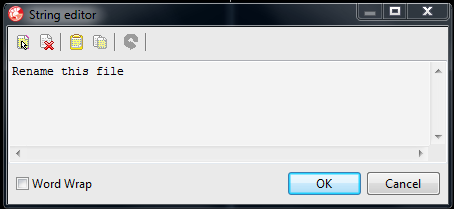
Delphi XE advanced (text) property editor

Here is a 3rd party text property editor for Delphi XE/Delphi XE2/Delphi XE3 that is way much better than the default one. It can help you to edit text and TCaption fields.

Features:
  • It allows you to enter multi-line strings via the object inspector. Such strings can only be assigned at run-time.
  • Allows you to enter very long strings
It adds an ellipsis button to the right hand side of the data entry area in the object inspector that displays a dialog box in which the property's value can be entered. 
F2 or Ctrl+Enter causes the entered text to be assigned to the property.
There are shortcuts that allows you to
  • Select all the text in the editor.
  • Clear all the text from the editor.
  • Overwrite the editor's existing text with text from the clipboard.
  • Copy all the text from the editor to the clipboard.
  • Undo the last edit.


You can download it from here. 
Original author: Peter Johnson


Related article: How difficult is to write a solid software protection (licensing) scheme?


Wednesday, March 13, 2013

How to prevent Delphi from generating bpl, identcache and local files

Delphi generates a series of annoying and useless files such as *.bpl, *.identcache and *.local. They are totally useless and safe to delete.

Few people know that Delphi Distiller is capable to disable the generation of these files. This is because the panel from where you do this is hidden under an obscure menu called 'Extras'. Just download Delphi Distiller and see for yourself. 


Piece of cake. Right?
_

Yest another useful features is 'Don't load .Net crap'.


Monday, March 11, 2013

More nasty bugs related to Delphi packages

The problem
 
My Delphi XE started to act strange lately. I have unit Unit2.pas that uses 'FormatBytes' declared in Unit1.pas. When I try to compile Unit2 Delphi says that it cannot find FormatBytes. But FormatBytes is there, in Unit1 !!

Unit1 belongs to Package1 and Unit2 to Package2 (Package2 depends on Package1).

Even more strange: if I delete Unit1 (pas and dcu) Delphi doesn't complain that it cannot find the unit! Its like Unit1 has been cached somewhere. However, if I try to open Unit1, obviously it cannot be found and Delphi popups a OpenDialog to let me show there Unit1 is located.

I know there is already a bug in the caching system for VCL. I guess this is a similar bug.


Update

Solution: I deleted all files related to all my packages:
  • DCP
  • BPL
  • DCU
  • DSK
  • DPROJ
  • paths from 'Library'
Then I rebuilt everything. Now everything compiles smoothly without warnings and errors. 
(Note: Initially I tried deleting files specified above except  Dproj and paths and it didn't worked)

Thursday, February 10, 2011

Memory limitations for Delphi 7

Application developed under Delphi 7 are 32 bit, and they can only access a limited amount of RAM. 
This Microsoft document says that the limit is 2GB.
So I have made some tests and indeed I could not allocate more than 2GB of RAM. However, The document also says that 32bit applications could access up to 3GB of RAM if the following conditions are met:
  • The OS uses the /3GB switch
  • The application has the IMAGE_FILE_LARGE_ADDRESS_AWARE flag set.
Here is the official documentation for /3GB switch.
There is a possible draw back when using the /3GB flag: the OS is squeezed in to 1GB of RAM, instead of 2GB. In some situations this might not be enough. However, I thin this is unlikely. 1GB should be enough for OS.


Related article: How difficult is to write a solid software protection (licensing) scheme?